
Deliver
Projects that each own a board, multi-assignee tickets, sub-tickets, comments and files. Deadlines read as overdue where you actually work, not buried a click deep.
Built by an agency, for agencies
Boards, time, money, leads and calendar in one workspace — so “what is moving, who is working, and did it make money” has one answer instead of four spreadsheets.
Free plan, no card required. Sign in with Google.

Your queue first, with the day's calendar and who is working right now.
Projects that each own a board, multi-assignee tickets, sub-tickets, comments and files. Deadlines read as overdue where you actually work, not buried a click deep.
Check in, run a timer against a ticket, and write the note that explains the hour. Idle protection stops a forgotten timer becoming a fictional eight-hour day.
Paid, outstanding and costs per project, with real profit and loss. Multi-currency throughout — every figure states its currency and never sums across them.
A pipeline kept separate from delivery: temperature, qualification, typed activity and follow-up dates, with everything needing a chase one click away.
The whole loop
Today
Your queue leads the page, with the actions you take most sitting beside it. Money waits one screen down, where a weekly number belongs. Arrange the widgets how you like — the layout follows you between devices.
Board
Drag tickets across columns and the change lands live for everyone. Overdue work is marked on the card itself, so a slipping deadline is visible at a glance instead of one click deep.

Financials
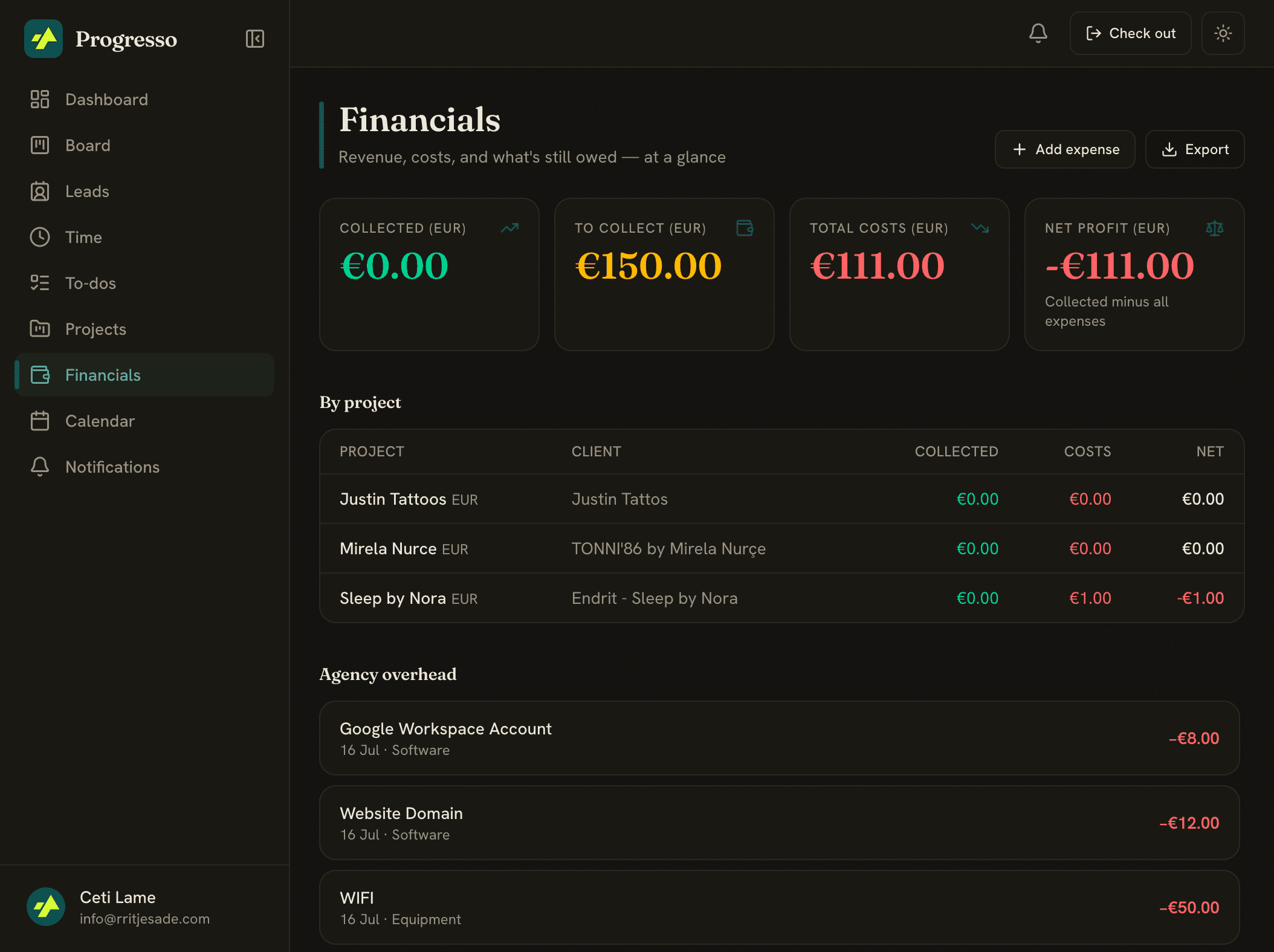
Collected, still to collect, costs and net — per project and across the agency. Expenses attach at agency, project or ticket level, so a project's margin reflects what it actually consumed.
Pipeline
Leads move through a real kanban carrying temperature and qualification. Anything hot, unowned or past its follow-up date is one filter away, and the follow-up checklist keeps a sequence running without a spreadsheet.

Time tracking that respects the person doing the work
Progresso can notice which app and document you are actually in, group that into work blocks, and suggest which ticket it belongs to — using a model that runs on your own machine. Nothing becomes a tracked hour until you approve it.
Monitoring software points the camera at the employee. This points it at the work, keeps the recording on their laptop, and asks before it writes anything down.

A shared agency calendar plus each person's own, synced from Google automatically at sign-in. Ticket due dates can be scheduled straight onto it.
Member and agency reports, a weekly recap email, and CSV exports of tickets and time for whenever you need them somewhere else.
A measured corpus of what actually performs — hook formats ranked by lift against a 43,000-article baseline, and shown only where the sample is large enough to mean anything.
Connect a compatible AI assistant and let it read and update your workspace directly, under the same roles you already set.
Set your own, or let a ticket deadline set one for you. On Agency plans, suggestions are drawn from your own overdue work — and never fire until you accept them.
Owner, admin, member and client-scoped guests, enforced in the database itself rather than only in the interface.
Projects are unlimited. Charging for them would punish the customer getting the most out of the product, so the things that genuinely cost money are metered openly instead — and every button that spends says what it costs before you press it.
Social publishing is built and waiting on platform review before it can post to a client’s accounts. Everything else on this page is live today.
Start on the free plan, bring one project across, and see whether the answers get easier to find.
Start free